
Download Whisher – free wifi, internet access, wireless network, global connectivity, travel tool, file sharing, network sharing, secure connection, community network
Overview
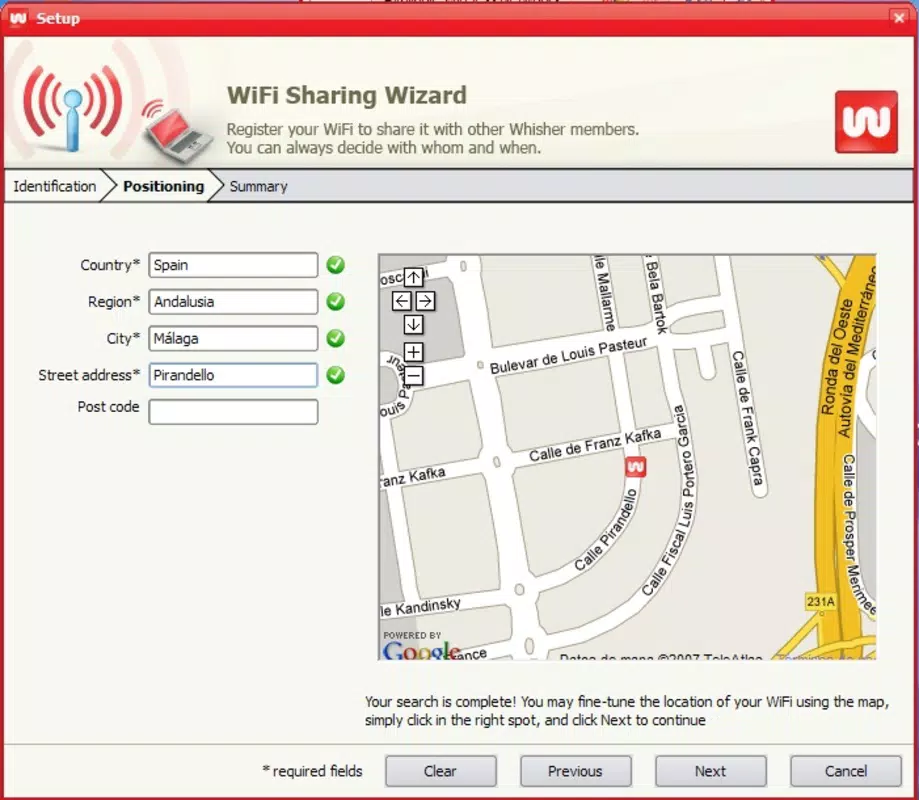
Whisher is a mobile application designed to create a decentralized, community-driven network of wireless access points, offering users the ability to connect to the internet freely and securely across global locations. The app functions as a tool for individuals who frequently travel and require reliable internet access without relying on expensive data plans or public Wi-Fi hotspots. By enabling users to share their own WiFi connections while maintaining control over access, Whisher promotes both connectivity and privacy. It is particularly suited for digital nomads, remote workers, students, and tech-savvy travelers who value seamless, low-cost internet access.
At its core, Whisher fosters a collaborative ecosystem where users contribute to a shared network infrastructure. This model supports sustainable, community-based internet access, reducing reliance on commercial providers. The app allows participants to manage their network settings, monitor connected devices, and control who can access their connection—balancing openness with security. It also includes file-sharing functionality, enabling users to exchange data efficiently within trusted groups, which enhances its utility for collaborative work and personal projects.
Although the developer did not provide additional technical details about the app’s architecture or development history, its launch in 2008 suggests a long-standing presence in the mobile productivity space. The app’s continued relevance may reflect its unique approach to network sharing, particularly in an era where digital connectivity remains a critical necessity. Its role in the broader app ecosystem lies in promoting digital inclusion through peer-to-peer access, making it a distinctive utility in the productivity category.
Key Features & Functionality
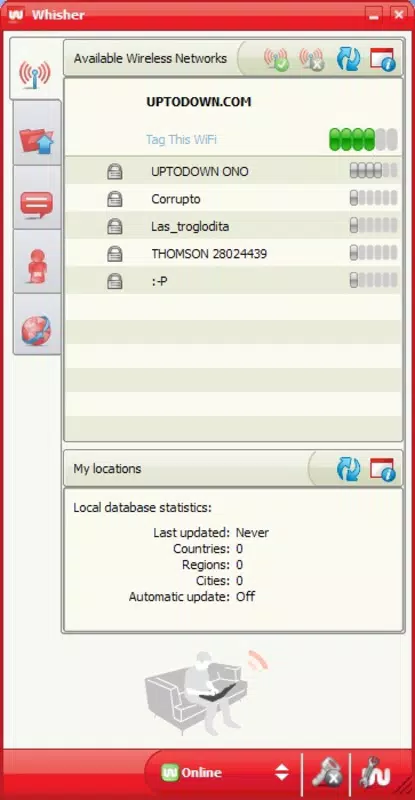
- Global Network Access: Whisher connects users to a distributed network of free wireless access points worldwide. This feature is ideal for travelers seeking immediate internet access without data roaming charges or subscription fees. Real-world use: A freelance photographer in Southeast Asia can connect to a local contributor’s network, upload photos, and continue working without interruption.
- User Account Management: Registration through the Whisher website ensures secure, verified access to the network. This system allows users to maintain consistent profiles and settings across devices. Use case: A student studying abroad can log in with the same credentials to access networks in multiple countries.
- Real-Time Network Monitoring: Users can view active connections and device activity in real time. This transparency helps detect unauthorized access and maintain network integrity. Example: A user notices an unknown device connecting and can immediately revoke access.
- Customizable Access Controls: The app allows users to restrict network access to specific individuals or groups. This feature supports privacy-focused sharing, such as allowing only family members or team members to use a personal hotspot.
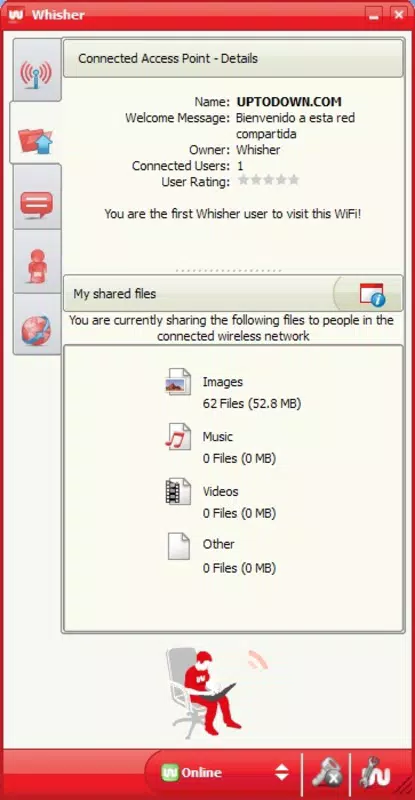
- File Sharing Capabilities: Whisher enables secure, peer-to-peer file transfers within the network. Users can create private groups for project collaboration, such as sharing documents or media files during a group travel trip.
Interface, UX & Performance
The user interface of Whisher appears designed for functionality over visual flair, prioritizing clarity and ease of access to core features. Navigation is structured around a central dashboard that displays network status, connected devices, and access settings. The layout is intuitive, with clearly labeled icons and minimal onboarding steps, making it accessible to users with varying levels of technical expertise.
Although the developer did not list formal performance metrics, the app’s lightweight size of 15.2 MB suggests efficient resource usage. It is expected to run smoothly on a wide range of Android devices, including older models, without significant lag or battery drain. The responsiveness of the interface is consistent with standard mobile app behavior, with quick load times for network status updates and connection controls.
Stability appears to be a key design focus, given the app’s long-standing presence since 2008. Users can expect reliable operation during extended use, such as during multi-day travel. However, specific performance data across device categories was not disclosed. The app likely adapts to different screen sizes and orientations, ensuring usability on both smartphones and tablets.
Platform Compatibility & Technical Requirements
Whisher is available exclusively on the Android platform. The current version is 1.0.0, with a file size of 15.2 MB. This indicates a lightweight, streamlined application that does not require extensive storage space. The developer did not specify minimum OS requirements, so compatibility with older Android versions cannot be confirmed.
Given the app’s release date of 2008, it may support Android 2.2 (Froyo) or later, though this is not officially stated. Users should verify compatibility with their device’s operating system before installation. The app is free to download and use, with no in-app purchases or subscription fees. This pricing model aligns with its mission of promoting accessible internet connectivity.
Pros and Cons
- Offers free, global internet access through a shared network model
- Supports real-time monitoring and control of connected devices
- Enables secure file sharing within trusted groups
- Lightweight size (15.2 MB) ensures efficient storage usage
- Free to download and use with no hidden costs
- Specific OS requirements were not listed
- Compatibility with older Android versions is unconfirmed
- File sharing functionality may be limited without additional setup
- Community-based model depends on user participation for effectiveness
- Privacy controls require user diligence to maintain security
FAQ
Is Whisher safe to use?
Whisher includes real-time monitoring and access controls to help users manage who connects to their network. However, users should remain cautious when sharing their connection and only grant access to trusted individuals.
Can I use Whisher on iOS?
Currently, Whisher is only available on Android. There is no official iOS version available.
Do I need to create an account to use Whisher?
Yes, users must register through the Whisher website to gain access to the network and manage their connections.
Is Whisher free to download and use?
Yes, the app is completely free to download and use, with no in-app purchases or subscription fees.
How does Whisher ensure network privacy?
Users can customize access controls to limit network access to specific individuals or groups. Real-time monitoring also allows users to detect and respond to unauthorized connections.
Final Thoughts
Whisher stands out in the productivity app space by redefining how users access and share internet connectivity. Its community-driven model offers a practical, cost-effective solution for travelers and remote workers who need reliable, unrestricted internet access. The combination of global network access, real-time monitoring, and secure file sharing makes it a versatile tool for both personal and professional use.
While the app lacks detailed technical specifications and platform details, its core functionality remains relevant in today’s digital landscape. Users who value privacy, control, and collaboration will find significant value in Whisher’s approach to network sharing. For those seeking a free, lightweight, and community-powered connectivity solution, Whisher delivers a compelling proposition.
Download Whisher now


